


Weather & Radar Forecast
4.914.82K Reviews
App Specs
- Version
- Varies with Device
- Updated On
- License
- Free
- Downloads
- 100,000,000+
- Developer
- WetterOnline
- Categories
- Weather
- Platform
- Android, iOS
Screenshots
 Analysis by AppCompare
I look at weather apps as practical decision tools, not just collections of temperatures. Weather & Radar - Storm radar is most useful when I need to judge what may happen nearby and decide whether to change a plan. Its radar, alerts, and everyday forecast make that job easier, though I would not treat any phone forecast as a guarantee—especially when a storm is moving quickly.
A forecast that helps with everyday choices
The app comes from WetterOnline, a weather-focused developer, and its appeal is straightforward: it brings local conditions and several kinds of weather information together instead of making me jump between separate tools. I can check what is happening now, look ahead, and open the radar when a simple forecast does not answer the question I actually have: is rain approaching my area, or is it likely to miss?
That distinction matters on an ordinary day. If I am deciding whether to walk to a nearby shop, take a bike, or wait before leaving, a glance at the local forecast gives me a starting point. When the sky looks uncertain, the radar adds useful context. It does not remove the need to use common sense, but it can help me avoid relying only on a quick look out of the window.
Guides and Analysis on Weather & Radar Forecast
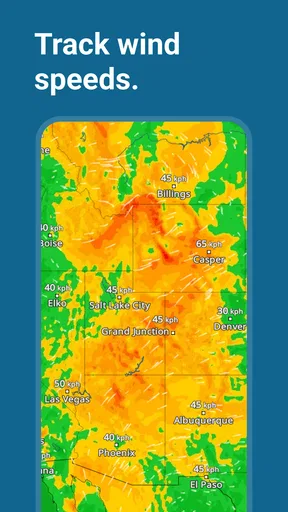
Rain is not the only reason I would open it. Snow and wind radar, air-quality information, and a weather widget make the app relevant to different routines. A person checking whether to dress for a cold commute may care most about the forecast; someone planning time outdoors may pay closer attention to wind or changing precipitation. The value is in being able to move between those questions in one place.
Reading the radar without over-trusting it
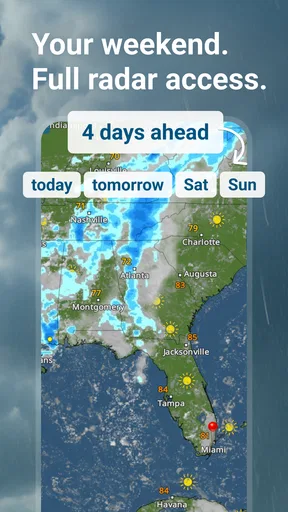
Radar is the feature I would reach for when timing matters more than a broad daily summary. Before setting out for a walk, for example, I can check whether a rain band appears close to my location and decide whether to bring a coat or postpone the trip. For a longer drive, I would use it as one part of preparation rather than as a promise that the route will stay clear.
A useful habit is to check the map at two scales. Zooming in can make local movement easier to interpret, while zooming back out helps show whether the patch of weather is isolated or part of a larger system. I would also compare the map with the forecast and current conditions instead of reading a single radar image as a complete answer. Weather changes, and a map can be less helpful if I expect it to predict every street-level detail.
That is a real strength, but also a limit worth keeping in mind: a detailed-looking radar can create more confidence than the forecast deserves. I use it to make a sensible near-term choice, not to decide that an outdoor event is definitely safe or that a storm will definitely pass by. For urgent hazards, official local warnings and safety advice should take priority over any app screen.
Worth Reading Before You Choose

ESPN’s Live Game View Makes Following Close Games Easier

QuizzLand Review: A Good Fit for Short Trivia Breaks, Not Every Player

Basketball Stars: Multiplayer Is Fast, but Can It Recover When Matches Go Wrong?

WEBTOON Turns Phone Updates Into a Better Reading Routine

Link to Windows Runs on Shared Habits, Not Social Feeds

How Alibaba.com Dominates the B2B Marketplace
Widgets, alerts, and a calmer daily routine
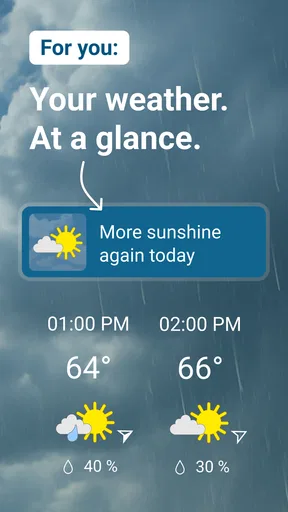
The widget can make routine checks quicker because I do not need to open the app every time I want a snapshot of the weather. I find that most helpful when I am getting ready: a glance at the home screen can remind me to take a layer or check conditions before leaving. A widget is less useful if I want to explore radar or compare several parts of a forecast, so I see it as a shortcut rather than a replacement for the full app.
Alerts serve a different purpose. They can bring severe-weather information to my attention when I am not actively checking the forecast. I would keep them enabled if I regularly travel outdoors or live in a place where conditions can change quickly, while someone who finds notifications distracting may prefer to limit them. It is worth reviewing alert settings so that an important warning is not lost among notifications that do not matter to your routine.
Air-quality information adds another reason to check before spending a long time outside, particularly for someone who is sensitive to poor air. It is a useful extra alongside weather, though it does not replace personal medical advice or local public-health guidance. Taken together, these tools make the app more than a way to check whether it is sunny: they help connect conditions to decisions about travel, exercise, and time outdoors.
First Impressions
When I first opened Weather & Radar - Storm radar, I was greeted with a sleek and intuitive interface. It didn't take me long to find my way around, which is always a plus in my book. The app immediately displayed the current weather conditions in my area, complete with temperature, precipitation, and wind speed. It felt like I was peeking out the window, but with way more detail.
Features That Stand Out
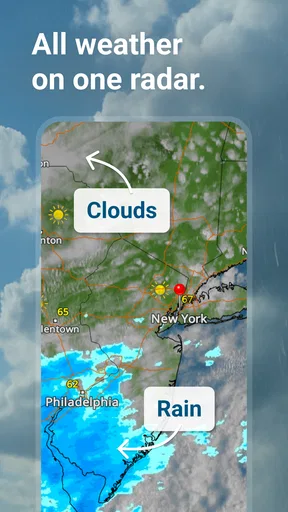
One of the standout features is the live radar. It's incredibly detailed and allows you to zoom in on your specific location to see real-time updates on rain, storms, and other weather events. I found this particularly useful when planning outdoor activities. No more guessing whether that dark cloud in the distance is heading my way!
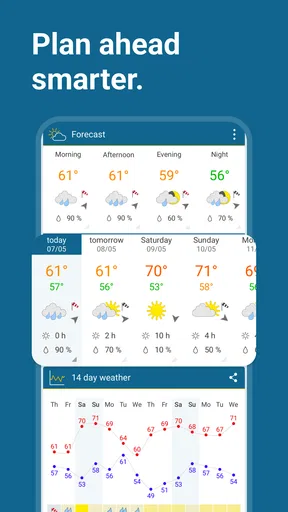
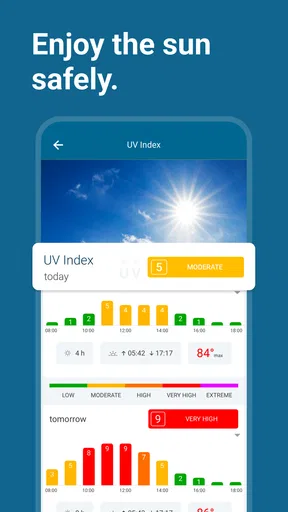
The app also offers a 14-day weather forecast, which is perfect for planning ahead. I loved being able to see not just the highs and lows of each day, but also details like UV index and humidity levels. It’s like having a crystal ball for weather.
Usability and Design
Let’s talk about the user experience for a moment. The design is clean and modern, with a pleasing color scheme that makes navigating the app a breeze. I appreciated the absence of unnecessary clutter, which often plagues weather apps. Instead, Weather & Radar - Storm radar focuses on delivering accurate information in an easy-to-understand format.
Notifications are another feature worth mentioning. The app sends timely alerts about severe weather conditions, which is essential for staying safe during extreme weather events. I found the notifications to be spot-on and not overly intrusive.
How it fits alongside other weather apps
Compared with a basic weather app that emphasizes a current temperature and a short forecast, this one gives me more ways to investigate conditions, especially through radar and its additional weather layers. That extra detail is helpful when I am choosing between leaving now and waiting, but it also means there is more on screen for someone who only wants a simple answer. If you prefer a minimal display, your phone’s built-in weather tool may feel quicker.
I would also distinguish it from specialist tools used for formal forecasting or emergency response. For everyday planning, an accessible map and local forecast are convenient; for decisions where safety depends on precise, official warnings, I would check the relevant local authority as well. The app works best as a practical companion, not as a substitute for every other source.
Who will get the most from it
I would recommend it to people who often plan around the weather: commuters who walk or cycle, parents deciding whether an outdoor plan is realistic, and anyone who likes checking a storm’s direction rather than simply seeing a rain icon. It is also a sensible choice for people who want weather and air-quality information in the same place, or who appreciate a widget for quick checks.
It may be less appealing if you rarely look beyond the day’s temperature, dislike notifications, or want the absolute simplest possible interface. A long-range forecast is useful for spotting broad trends, but I would not lock in a specific outdoor plan based only on details far ahead. As the date approaches, I would check again and use the radar for decisions that depend on near-term rain.
A realistic day with the app
Imagine I have a morning appointment and hope to walk there, but rain is possible later. I can check the local conditions while getting ready, use the forecast to judge the general shape of the day, and then look at radar before leaving. If the map suggests rain is nearby, I can take an umbrella or choose another way to travel. Later, an alert may prompt me to check again if severe weather becomes relevant.
The useful part of that routine is not that the app makes the decision for me; it is that each screen answers a different question. The forecast helps with the plan, radar helps with timing, and an alert can draw attention to a changing situation. I would still leave room for uncertainty, particularly if the weather is already unsettled.
Practical trade-offs before installing
The app is free to download and is rated for Everyone. It has a 4.7 average from around 2.4 million ratings, with more than 100 million installs, which suggests that it has reached a broad audience. Optional in-app purchases range from about $0.99 to $8.99 per item, so I would check what is offered in the app if I am considering a paid extra rather than assuming every feature has the same cost or availability.
One practical consideration is attention. Weather widgets and alerts can be useful, but they can also encourage repeated checking. I get the most value by using the widget for a quick glance and opening the full app when I have a real decision to make. That keeps the radar from becoming something I stare at without changing what I do.
Another is interpretation. A forecast for a broader area may not match conditions on one particular street, and a radar display is a view of weather activity rather than a personal guarantee. If I am planning a hike, a long trip, or an event where a sudden change would matter, I check again close to departure and use more than one source when appropriate.
My final take
Overall, I’m genuinely impressed with Weather & Radar - Storm radar. It combines accuracy with user-friendly functionality, making it a valuable tool for anyone who wants to stay informed about the weather. Whether you’re a weather enthusiast or just someone looking to avoid getting soaked, this app is definitely worth checking out. So why not give it a try? You might just find it becomes your go-to weather app!
My recommendation is strongest for people who want more than a temperature readout and will actually use radar, alerts, or the widget to guide everyday choices. I would skip it if a bare-bones forecast is all you need, or if you expect any app to remove uncertainty from fast-changing weather. Used with sensible expectations, it is a capable, convenient weather companion that can help me plan the day without pretending to control it.
Pros
- Accurate weather forecasts for multiple locations.
- Detailed radar images with real-time updates.
- Customizable alerts for severe weather conditions.
- User-friendly interface and easy navigation.
- Offers a wide range of weather data insights.
Cons
- Contains ads in the free version.
- Some features require in-app purchases.
- May drain battery with continuous use.
- Occasional loading delays in radar images.
- Requires stable internet for real-time updates.
FAQs for Weather & Radar Forecast
What features does Weather & Radar - Storm Radar offer?
Weather & Radar - Storm Radar provides a comprehensive suite of features, including real-time weather forecasts, live radar maps, and severe weather alerts. Users can access detailed forecasts for up to 14 days, view hourly updates, and receive notifications about upcoming storms, ensuring they stay informed about any weather changes.
Is Weather & Radar - Storm Radar free to use?
The app offers both free and premium versions. The free version includes basic features like weather forecasts and radar maps. However, for an ad-free experience and additional features such as extended forecasts and enhanced radar options, users can opt for the premium subscription available within the app.
How accurate are the forecasts provided by the app?
Weather & Radar - Storm Radar is known for its high level of accuracy, thanks to its use of advanced meteorological data and technology. The app sources information from reliable weather stations and satellites, offering precise and up-to-date forecasts. However, as with any weather app, slight discrepancies can occur due to rapidly changing weather conditions.
Can I customize notifications in Weather & Radar - Storm Radar?
Yes, the app allows users to customize notifications to suit their needs. You can set alerts for specific weather conditions, such as thunderstorms, heavy rain, or extreme temperatures. Additionally, users can choose the frequency of updates and select which locations to receive alerts for, providing a personalized weather experience.
Does Weather & Radar - Storm Radar support multiple locations?
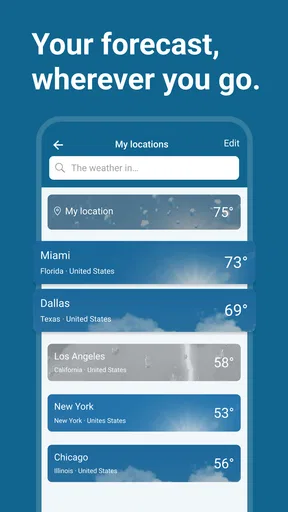
Absolutely. The app supports tracking weather in multiple locations, making it ideal for users who travel frequently or want to keep tabs on weather conditions for family members in different areas. You can easily add and switch between locations within the app to view detailed forecasts and radar data for each area.


